


When reading MQB49 5D key data with Xhorse VVDI Key Tool Plus, you may get the error “CLK Not Connected” when using the MCU cable.
If the key can be read successfully with a GODIAG clip adapter, you can quickly check whether the MCU adapter is faulty:
- Disconnect the MCU adapter.
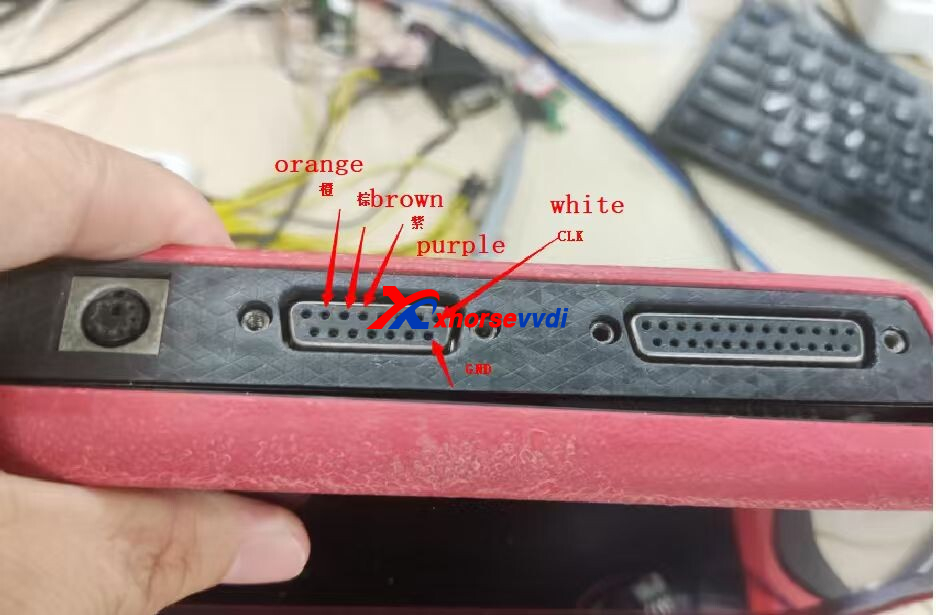
- Connect the cable directly to the DB15 port on the Key Tool Plus tablet.
- Try reading the key data again.
Result:
- If the key data is read successfully, the MCU adapter/cable is likely defective.
- If the error remains, check the soldering points, CLK line, and wiring connections.
If the MCU adapter is confirmed faulty and your device is still under warranty, contact your seller for a replacement.
Skype: xhorsevvdi.com
Whatsapp: https://wa.me/8613983756354


 Whatsapp:
 Skype: