
Problem:
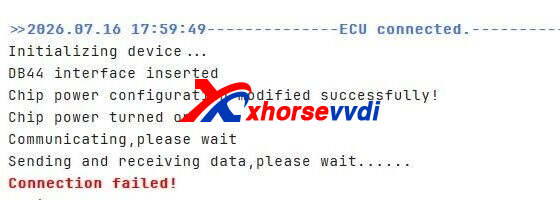
After updating the Xhorse Multi-Prog software to V1.4.2.0 (with the latest database installed), several users have reported unexpected communication issues when working with certain Bosch ECUs, including EDC17CP49, EDC17CP02, and EDC17C50. If you’re experiencing connection failures after the update, it’s worth checking whether the issue is software-related before troubleshooting your wiring or hardware. Stay tuned for further updates and possible solutions from the community.
Solution:
Perform the hardware self-test diagnostic:
1.Perform MCU Cable Test:
Open Multi-Prog software.
Navigate to: Help -> Auxiliary Function -> MCU Cable Test.
2.Perform ECU Cable Test:
Navigate to: Help -> Test Channel.
Input/Select Type 170.
Refer to the connection diagram displayed on the right panel to wire the test setup.
3.Submit Test Data:
Export the generated test report and forward it to Xhorse technical support for factory engineering analysis.
Executing these test routines allows Xhorse engineers to determine whether the issue stems from a firmware handshake error post-V1.4.2.0 update or a physical channel pin activation failure.
Skype: xhorsevvdi.com
Whatsapp: https://wa.me/8613983756354


 Whatsapp:
 Skype: