


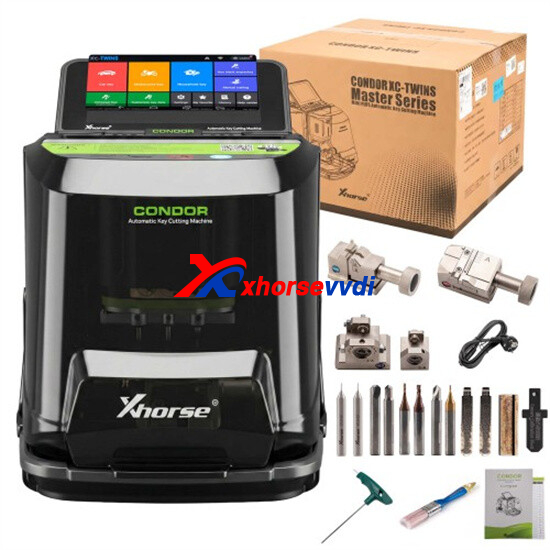
The Xhorse Condor XC-Twins is a dual-station automatic key cutting machine developed for professional automotive and residential locksmith applications. Featuring high-precision decoding, intelligent calibration, and multi-clamp compatibility, XC-Twins delivers efficient key duplication and advanced cutting performance for modern locksmith workshops.
1. Clamp Compatibility & Key Support
Q1: Which key types are supported by the M5L Clamp?
The M5L Clamp is a multi-functional clamp designed for various automotive laser key structures:
- Side A supports 4-track external and 2-track external laser keys.
- Side B supports 4-track internal and channel-track key profiles.
It is widely used for modern automotive smart key duplication.
Q2: What is the primary function of the M6 Clamp?
The M6 Clamp is specially engineered for residential and security key applications. It supports:
- Single-row dimple keys
- Double-row dimple keys
- “Smiley” profile residential keys
This clamp is ideal for locksmith shops handling household key services.
Q3: Which special key profiles are compatible with the M3 Clamp?
The M3 Clamp is dedicated to uncommon automotive key structures:
- Side 3-A is designed for Ford FO21 Tibbe keys.
- Side 3-B supports Citroën SX9 cross keys.
The clamp improves stability and precision when working with special-profile automotive keys.
Q4: When should the M4 Clamp be used?
The M4 Clamp is an optional auxiliary fixture mainly used for standard residential key blanks requiring additional support during cutting and decoding procedures.
2. Cutter & Clamp Installation Procedures
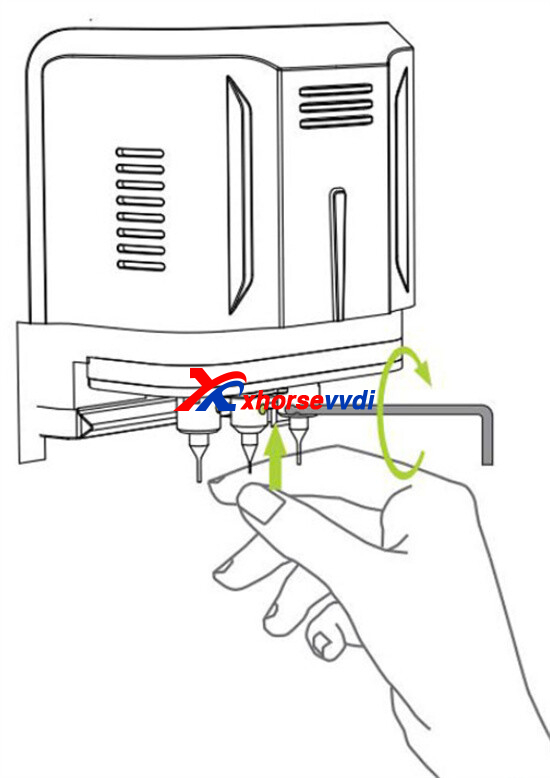
Q5: How do I properly install the milling cutter?
1).Insert the cutter upward into the spindle until it reaches the top limit position.
2).Rotate the locking wrench clockwise to firmly secure the cutter.
3).Ensure the cutter is fully tightened before starting operation.
Proper installation helps maintain cutting precision and reduces cutter vibration.
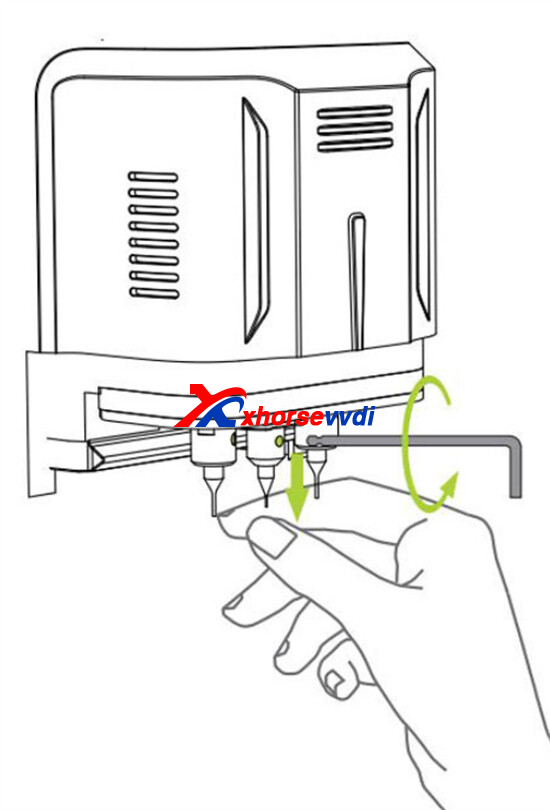
Q6: What is the correct way to remove the cutter?
1).Support the cutter carefully from underneath.
2).Rotate the wrench counterclockwise to loosen the spindle lock.
3).Slowly remove the cutter downward to avoid accidental dropping.
Always power off the machine before performing cutter replacement.
Q7: How do I install a clamp onto the XC-Twins?
1).Loosen the clamp locking knob by rotating it counterclockwise.
2).Slide the clamp into the guide rail from the right side.
3).Push the clamp fully until it reaches the stopper position.
4).Tighten the locking knob clockwise to secure the clamp.
Correct installation ensures accurate decoding and stable cutting performance.
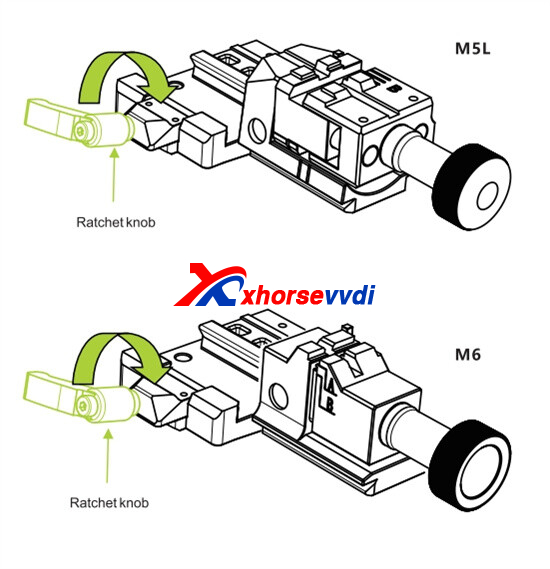
Q8: How can I switch the M5L Clamp between Side A and Side B?
1).Loosen the tightening knob.
2).Slide the clamp block completely to the right side.
3).Rotate the block clockwise to flip between Side A and Side B.
4).Retighten the knob firmly after positioning.
This design allows quick switching between different laser key structures.
3. First-Time Activation & Account Registration
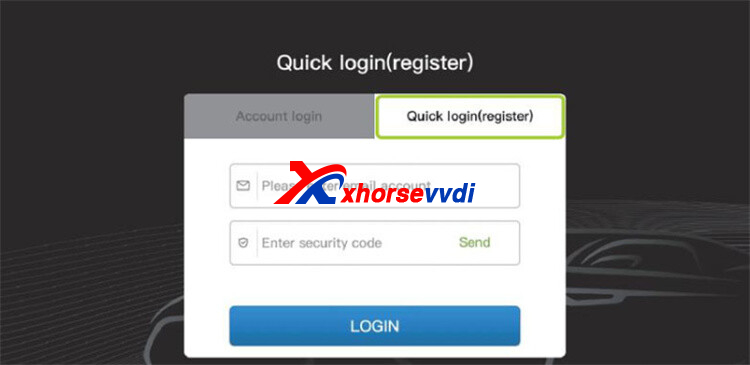
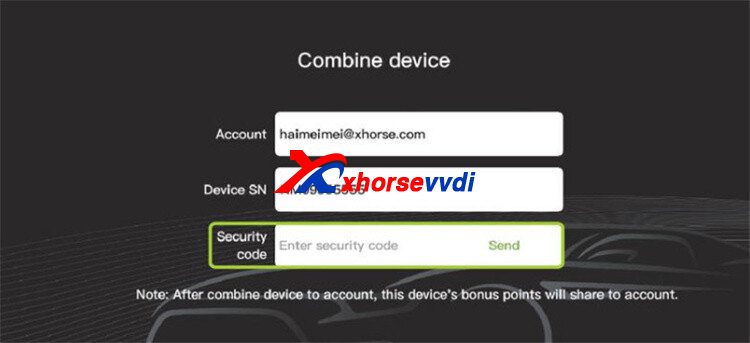
Q9: What is the initial activation procedure for XC-Twins?
To activate your Condor XC-Twins for the first time, follow this sequence:
1).Power on the XC-Twins and select “START TO SET”.
2).Connect the machine to a stable WiFi network.
3).Log into your Xhorse account or create a new account via email registration.
4).Enter the verification code to bind the Serial Number (SN).
5).After successful activation, tap “START TO USE”.
The machine will then initialize all online functions and services.
Q10: What are the advantages of binding the machine to an Xhorse account?
After account binding, users can access:
- OTA firmware upgrades
- Online key databases
- Cloud synchronization services
- Bonus point rewards from key cutting operations
- Future software feature updates
The device becomes permanently associated with the registered account.
4. Recommended System Update Procedure
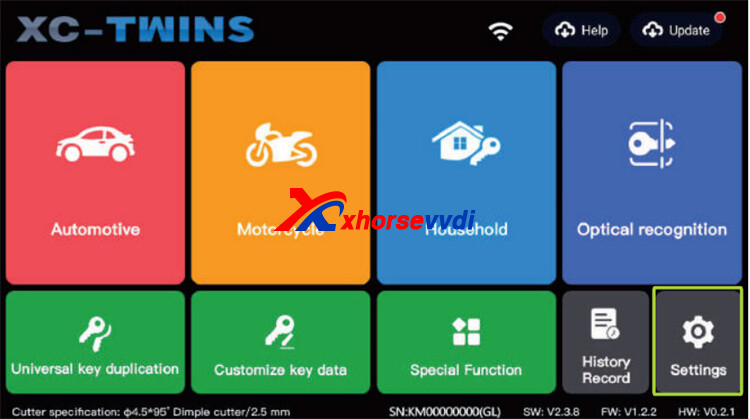
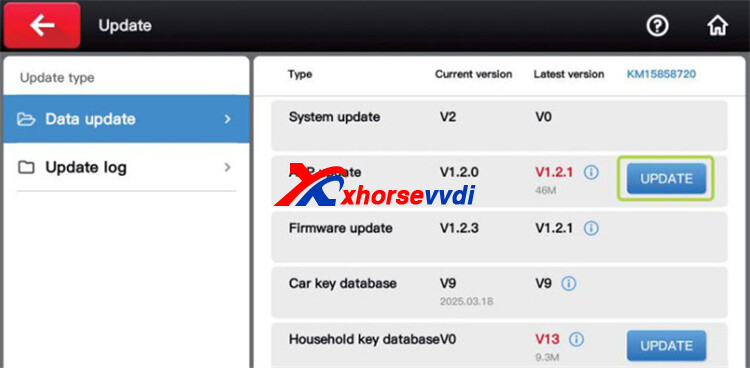
Q11: What is the correct update sequence for XC-Twins?
To prevent software conflicts or update failures, updates must follow this order exactly:
System Update → APP Update → Firmware Update
Only after these steps are completed should users perform database updates.
Q12: When should automotive and residential databases be updated?
Vehicle and residential key databases should be updated only after all system-level updates are successfully completed.
This ensures full compatibility between software modules and decoding libraries.
Q13: Why are firmware updates important?
Firmware updates may provide:
- Support for newly released vehicles
- Improved decoding algorithms
- Better cutting accuracy
- Enhanced machine stability
- Bug fixes and performance optimization
Regular updates help maintain professional cutting performance.
5. Typical Applications & Professional Usage
The Xhorse Condor XC-Twins automatic key cutting machine is widely used by:
- Automotive locksmiths
- Mobile key programming specialists
- Security hardware workshops
- Residential locksmith service providers
Its common applications include:
- Laser key duplication
- Tibbe and dimple key cutting
- Automotive smart key generation
- Residential key copying
- High-precision decoding and milling
- Cloud-based locksmith system management
With intelligent clamp design, wireless connectivity, and advanced cutting technology, the XC-Twins provides a reliable all-in-one solution for modern locksmith professionals.
Skype: xhorsevvdi.com
Whatsapp: https://wa.me/8613983756354


 Whatsapp:
 Skype: