


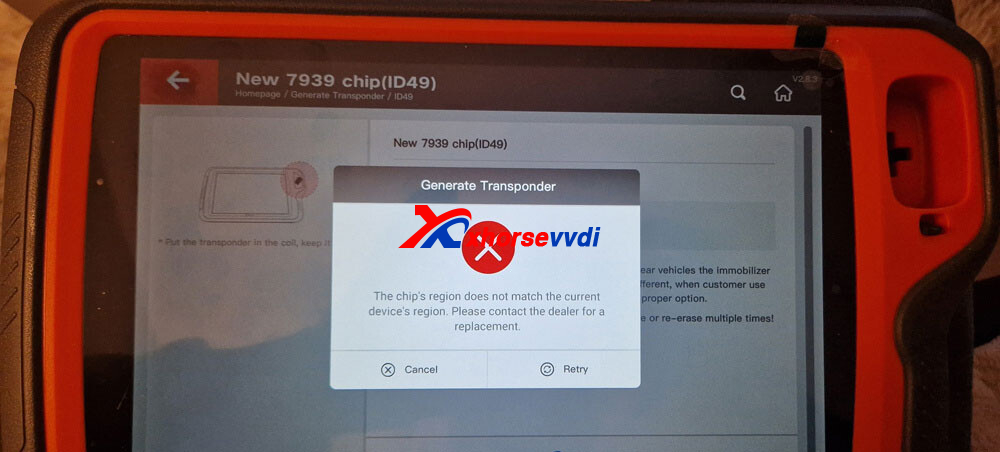
Some users may encounter an error when generating an ID49 chip with the Xhorse VVDI XT57B Super Chip. The device displays the message:
“The chip’s region does not match the current device’s region.”
As a result, the XT57B fails to generate the required ID49 chip.
Cause of the Problem:
This issue is caused by region locking. Xhorse Super Chips and VVDI devices are locked to specific regions:
- Chinese (CN) version chips only work with CN version Xhorse devices
- Global (English) version chips only work with Global version Xhorse devices
If you use a Chinese-version XT57B Super Chip with a Global/English VVDI device, the system will reject the chip due to a region mismatch.
Solution:
The solution is straightforward:
- If you are using a Global/English VVDI device, make sure to purchase the XT57B Global English version
- Do not use the Chinese-version XT57B with Global devices
To avoid compatibility issues, always confirm that the chip region matches your device region before purchasing.
Recommendation:
Buy the VVDI XT57B Super Chip Global Version from XhorseVVDI.com to ensure full compatibility and proper ID49 chip generation:
https://www.xhorsevvdi.com/wholesale/xhorse-xt57b-super-chip.html


 Whatsapp:
 Skype: